Selecting a Site to Associate to Project
Creation date: 23/04/2026 14:35
Updated: 23/04/2026 14:35
Question:
Answer:
When I set up a project on ESdat, it wouldn’t allow me to set the site I need to assign. I cannot see the other sites in the dropdown, only the site currently assigned to it which is incorrect and is now impacting the sampling numbering.
Answer:
If you have samples assigned to Locations from the "incorrect" Site, you will not be able to deselect this from the Project until that data has been assigned to the correct Site.
The basic workflow will be:
- Add the new Site to the Project
- Reassign all existing samples to Locations on the correct Site
- Once all samples are associated with the correct Site you will be able to deselect the old Site from the Projects/Sites menu
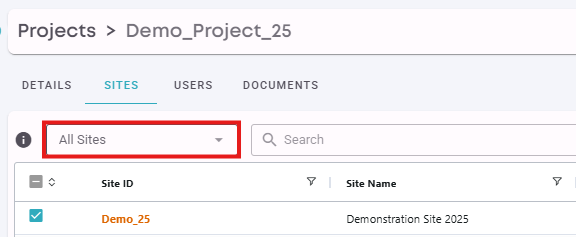
When assigning the Site, you will need to change the drop down to "All Sites" to see the complete list:
DataImage88.png
DataImage44.png